1、点击顶部菜单栏RUN,选中edit configurations...,进入配置页面

2、进入设置页面后,点击application左边的小箭头,展开你的application,此时你的右边working directory还是初始默认的工作区间,但是idea不能识别这个工作区间。

3、方法一:直接将工作区间删掉,应用后保存即可,如图

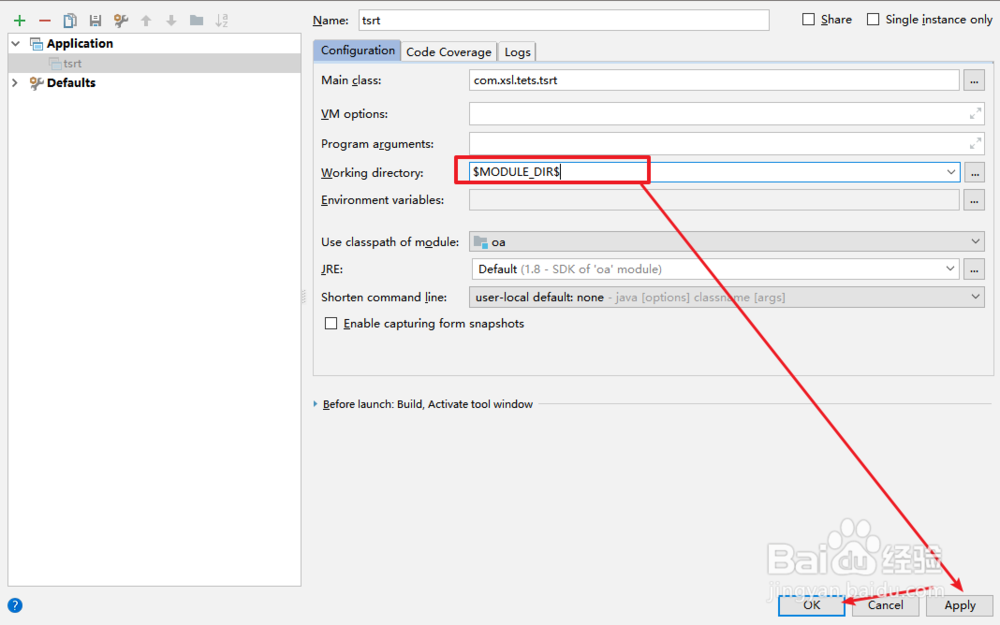
1、方法二:在working directory中选择动态识别工作区间,即$MODULE_DIR$,应用后保存即可,如图:
1、点击顶部菜单栏RUN,选中edit configurations...,进入配置页面
2、进入设置页面后,点击application左边的小箭头,展开你的application,此时你的右边working directory还是初始默认的工作区间,但是idea不能识别这个工作区间。
3、方法一:直接将工作区间删掉,应用后保存即可,如图
1、方法二:在working directory中选择动态识别工作区间,即$MODULE_DIR$,应用后保存即可,如图: